If you are trying to grow your website, blog, or small business online in 2026, you’ve probably realized one hard truth is that where the semrush tutorial is important.
👉 Guessing no longer works in SEO.
Google has become smarter, competition has increased, and AI-powered content is everywhere. To rank today, you need real data, not assumptions. This is exactly where SEMrush comes in.
This SEMrush tutorial for beginners is written for people who:
- Are new to SEO
- Feel overwhelmed by SEMrush
- Step-by-step clarity
- Results, not jargon
- Want to turn traffic into money (blogs, affiliates, services)
Unlike short tutorials, this guide goes deep. It’s designed to help you understand SEMrush from the ground up, so you can confidently use it even if you’ve never touched an SEO tool before.
We’ll start from the absolute basics in Part 1 and gradually move into advanced strategies in later sections — without losing simplicity.
Why This SEMrush Tutorial Is Different
Most SEMrush guides online fail beginners for three reasons:
- They assume prior SEO knowledge
- Explain features, not how to use them properly
- Don’t connect SEMrush to real business outcomes
This guide is different.
If you’ve been searching for a complete SEMrush tutorial for beginners, this is the guide you bookmark and come back to.
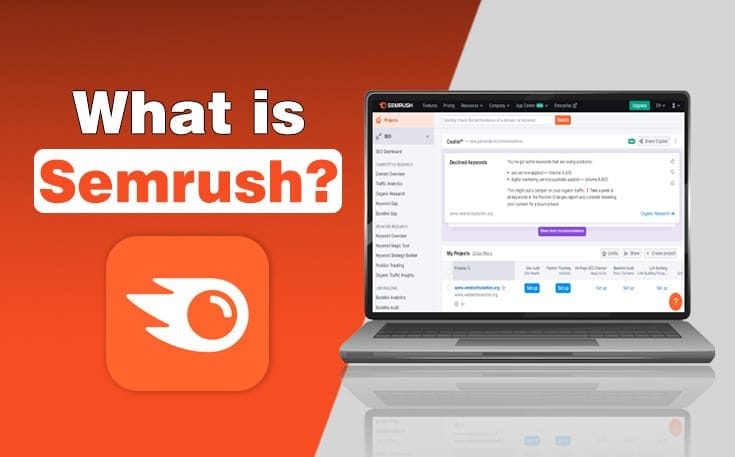
What Is SEMrush? (Beginner Explanation)
SEMrush is an all-in-one digital marketing and SEO platform that helps you understand:
- What people are searching on Google
- Which keywords can bring traffic
- What your competitors are ranking for
- Why some websites rank higher than others
- How to fix SEO issues on your site
- How to plan content that actually ranks
In simple terms:
SEMrush shows you what works online — using data.
Instead of guessing:
- “Will this blog rank?”
- “Is this keyword worth targeting?”
- “Why is my competitor ahead of me?”
SEMrush gives you clear answers backed by numbers.
A Simple Analogy (Very Important for Beginners)
Think of SEO like farming.
- Your website = land
- Keywords = seeds
- Content = crops
- Google = weather
- SEMrush = soil testing + weather forecast + farming guide
Without SEMrush, you’re planting seeds randomly and hoping something grows.
With SEMrush, you:
- Choose the right seeds (keywords)
- Know how difficult they are to grow
- See what crops your neighbor (competitor) is growing
- Fix soil problems before planting
That’s why SEMrush is so powerful — especially for beginners.
How Popular Is SEMrush? (Updated Stats – 2026)
To understand whether a tool is worth learning, look at adoption.
As of 2026:
- SEMrush has 10+ million users worldwide
- Tracks 25+ billion keywords
- Covers 140+ countries
- Used by brands like Amazon, Tesla, Shopify, Forbes, and thousands of small businesses
- SEMrush data is trusted by SEO agencies globally
This tells us two things:
- The data is reliable
- Learning SEMrush is a future-proof skill
For beginners, this matters because you’re learning a tool that won’t disappear next year.
Why SEMrush tutorial Is Important in 2026 (Not Optional Anymore)
SEO in 2026 is very different from SEO 5–6 years ago.
Here’s what changed:
1. Google Is Smarter
Google now understands:
- Search intent
- Content quality
- Topical authority
- User behavior
- AI-generated content vs helpful content
Random blogging without research rarely works anymore.
2. Competition Has Increased
- Every niche has hundreds of blogs
- AI tools allow mass content creation
- Only strategic SEO wins
3. Data-Driven SEO Wins
SEMrush helps you:
- Avoid impossible keywords
- Focus on realistic opportunities
- Build content clusters
- Track progress accurately
That’s why learning SEMrush through a proper SEMrush tutorial for beginners is no longer optional — it’s essential.
Who Should Use SEMrush? (Beginner-Focused)
Moreover ,SEMrush is NOT only for SEO experts.
It’s ideal for:
1. Bloggers & Affiliate Marketers
- Find low-competition keywords
- Spy on competitor content
- Optimize blog posts
- Track rankings
- Build backlinks
2. Small Business Owners
- Rank for local keywords
- Analyze local competitors
- Improve website SEO without hiring agencies
- Get more leads organically
3. Freelancers & SEO Learners
- Learn real-world SEO
- Use data-backed strategies
- Improve client results
- Build long-term skills
4. E-commerce & D2C Brands
- Product keyword research
- Category page optimization
- Competitor pricing & ads analysis
If you belong to any of these groups, SEMrush can directly impact your growth.
SEMrush tutorial for Indian Users (Important Perspective)
Many beginners in India worry:
“Does SEMrush work well for Indian keywords?”
The answer is YES.
SEMrush has a strong India keyword database and supports:
- Indian search volumes
- Local intent keywords
- City-based SEO
- Hindi-English mixed queries
- Indian ecommerce & service niches
For Indian bloggers and small businesses, SEMrush is often more accurate than cheaper tools.
How SEMrush Works (Beginner Mental Model)
Before clicking buttons, you need to understand how SEMrush thinks.
SEMrush works on three main pillars:
1. Keyword Data
- What people search
- How often they search
- How hard it is to rank
- What Google shows for that keyword
2. Competitor Data
- Which websites rank
- What content works
- Where backlinks come from
- Which keywords bring traffic
3. Website Data
- Technical health
- Content quality
- SEO errors
- Ranking progress
Everything in SEMrush connects back to these three pillars.
Once you understand this, SEMrush becomes much easier.
Creating a SEMrush Account (Step-by-Step)
Before using SEMrush, you need an account.
Step 1: Visit SEMrush Website
Go to SEMrush official website and click on Start Free Trial.
Step 2: Choose a Plan (Beginner Tip)
For beginners:
- Choose Pro Plan
- Or start with free account / trial
You do NOT need expensive plans when starting.
Step 3: Sign Up
- Password
- Basic details
No technical setup required.
SEMrush Free vs Paid (Beginner Reality)
Free Version
- Limited searches per day
- Good for learning basics
- Not enough for serious SEO
Paid Version
- Full keyword data
- Competitor analysis
- Site audits
- Content tools
- Rank tracking
👉 Beginner advice:
Use free version to explore → upgrade only when you’re ready to apply consistently.
What Beginners Should Focus on First (Very Important)
SEMrush has many features, but beginners should NOT try everything at once.
Focus on these first:
- Keyword Research
- Competitor Analysis
- Site Audit
- Content Optimization
Ignore:
- PPC tools
- Advanced advertising reports
- Social media tools (initially)
This focused approach prevents overwhelm and helps you see results faster.
Keyword Research Mastery Using SEMrush (Beginner to Pro)
Keyword research is the foundation of SEO success. No matter how good your content is, if you target the wrong keywords, your pages simply won’t rank.
This part of the SEMrush tutorial for beginners will teach you:
- SEMrush uses for keyword research step by step
- Avoid high-competition keywords
- How to find keywords that beginners can actually rank for
- Understanding of search intent (very important in 2026)
We’ll go slow, explain everything, and use real examples.
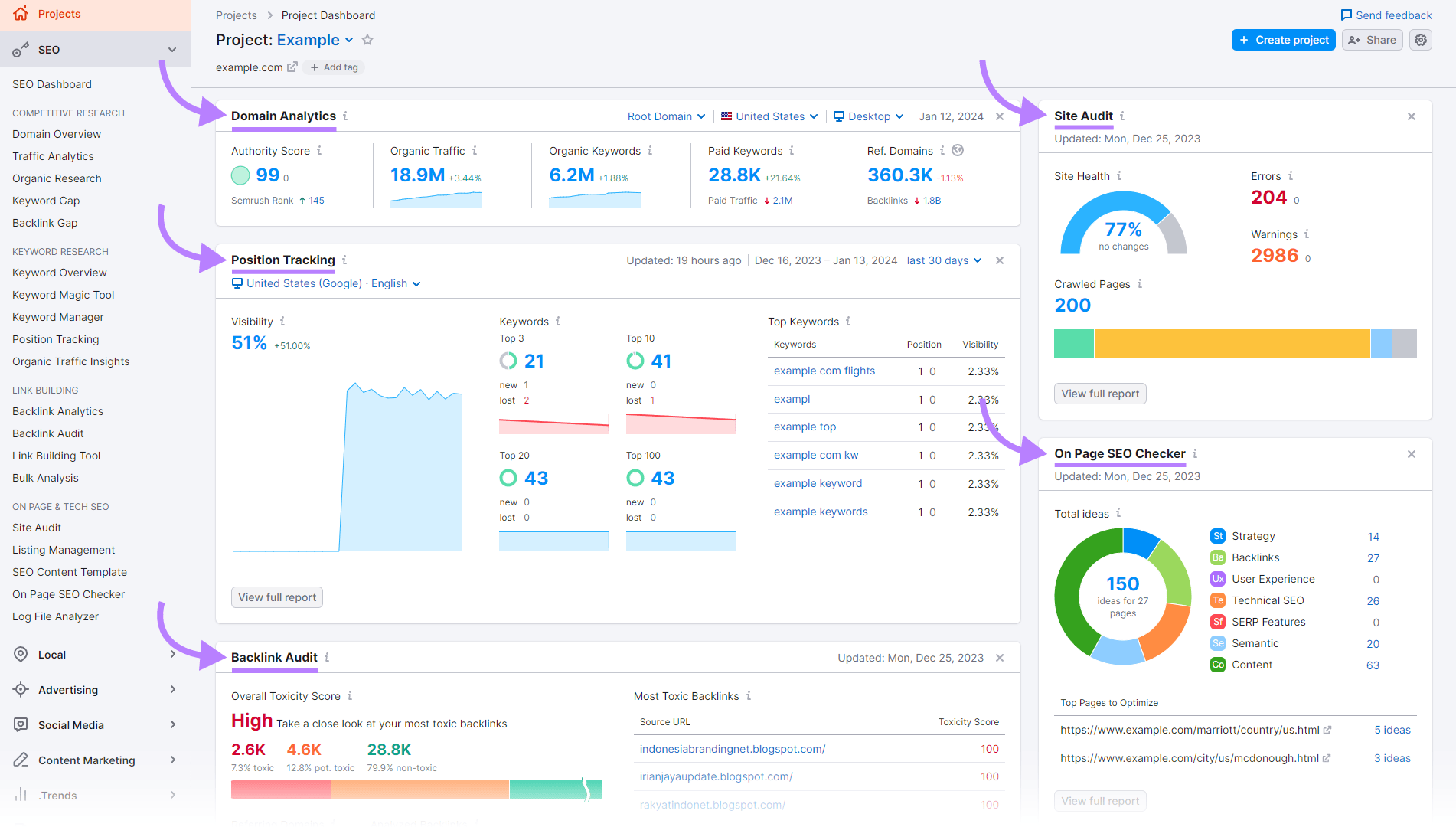
Understanding the SEMrush Dashboard (Beginner Walkthrough)
When you log into SEMrush, the dashboard might look intimidating. Don’t worry — you only need to understand a few sections.
Main Dashboard Sections Beginners Should Know
- SEO → Keyword research, site audits, rankings
- Competitive Research → Analyze competitors
- Content Marketing → Content planning & optimization
- Projects → Track your website’s performance
For now, focus only on:
- Keyword Overview
- Keyword Magic Tool
Everything else comes later.
What Is Keyword Research? (Beginner Explanation)
Keyword research is the process of finding what people type into Google.
Example:
- “best laptop under 60000”
- “how to use SEMrush”
- “SEMrush tutorial for beginners”
Each keyword has:
- Search volume
- Competition level
- Search intent
SEMrush helps you see all of this before writing content.
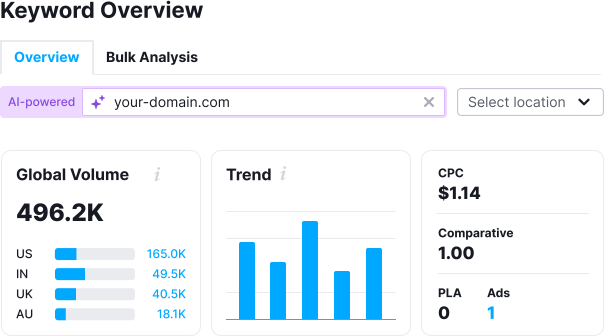
Keyword Overview Tool (Step-by-Step)
The Keyword Overview tool gives you a quick snapshot of any keyword.
How to Use It
- Go to SEO → Keyword Overview
- Enter a keyword
- Example:semrush tutorial for beginners
- Select your country (India, US, etc.)
- Click Search
What You’ll See (Explained Simply)
1. Search Volume
- Average monthly searches
- Higher ≠ always better
Beginner tip:
Target keywords with moderate volume + low competition
2. Keyword Difficulty (KD%)
- Shows how hard it is to rank
- Scale: 0–100
General guideline:
- 0–29 → Easy
- 30–49 → Possible
- 50+ → Hard for beginners
3. Search Intent (Very Important in 2026)
SEMrush categorizes keywords into:
- Informational – Learn something
- Commercial – Compare products
- Transactional – Buy now
- Navigational – Brand searches
For beginners:
- Informational + Commercial = best
4. SERP Analysis
Shows:
- Top-ranking pages
- Domain strength
- Content type
This tells you what Google prefers for that keyword.
Why Most Beginners Fail at Keyword Research
Common mistakes:
- Targeting very high-volume keywords
- Ignoring keyword difficulty
- Not checking search intent
- Writing content that doesn’t match SERP
SEMrush helps beginners avoid these mistakes by showing all data upfront.
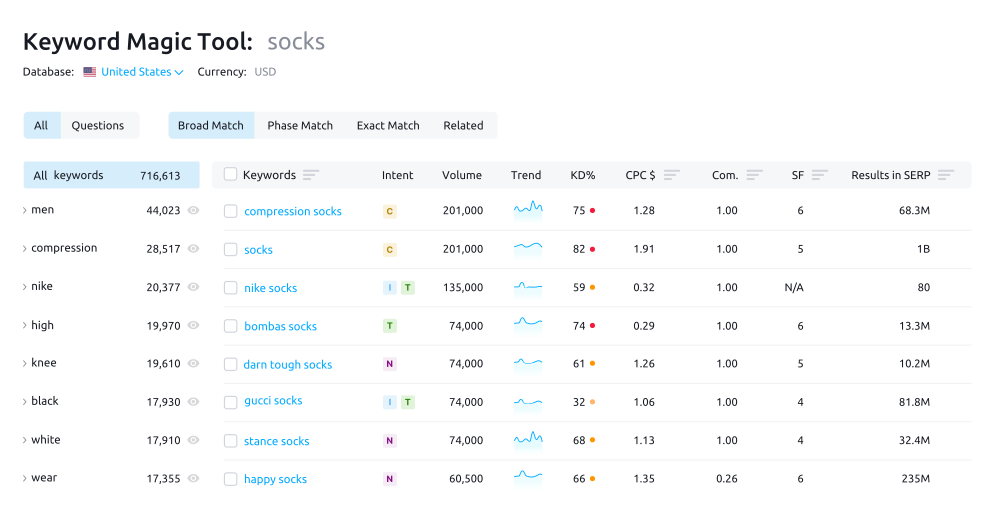
Keyword Magic Tool (The Most Powerful Feature)
The Keyword Magic Tool is where SEMrush becomes unbeatable.
What It Does
- Generates thousands of keyword ideas
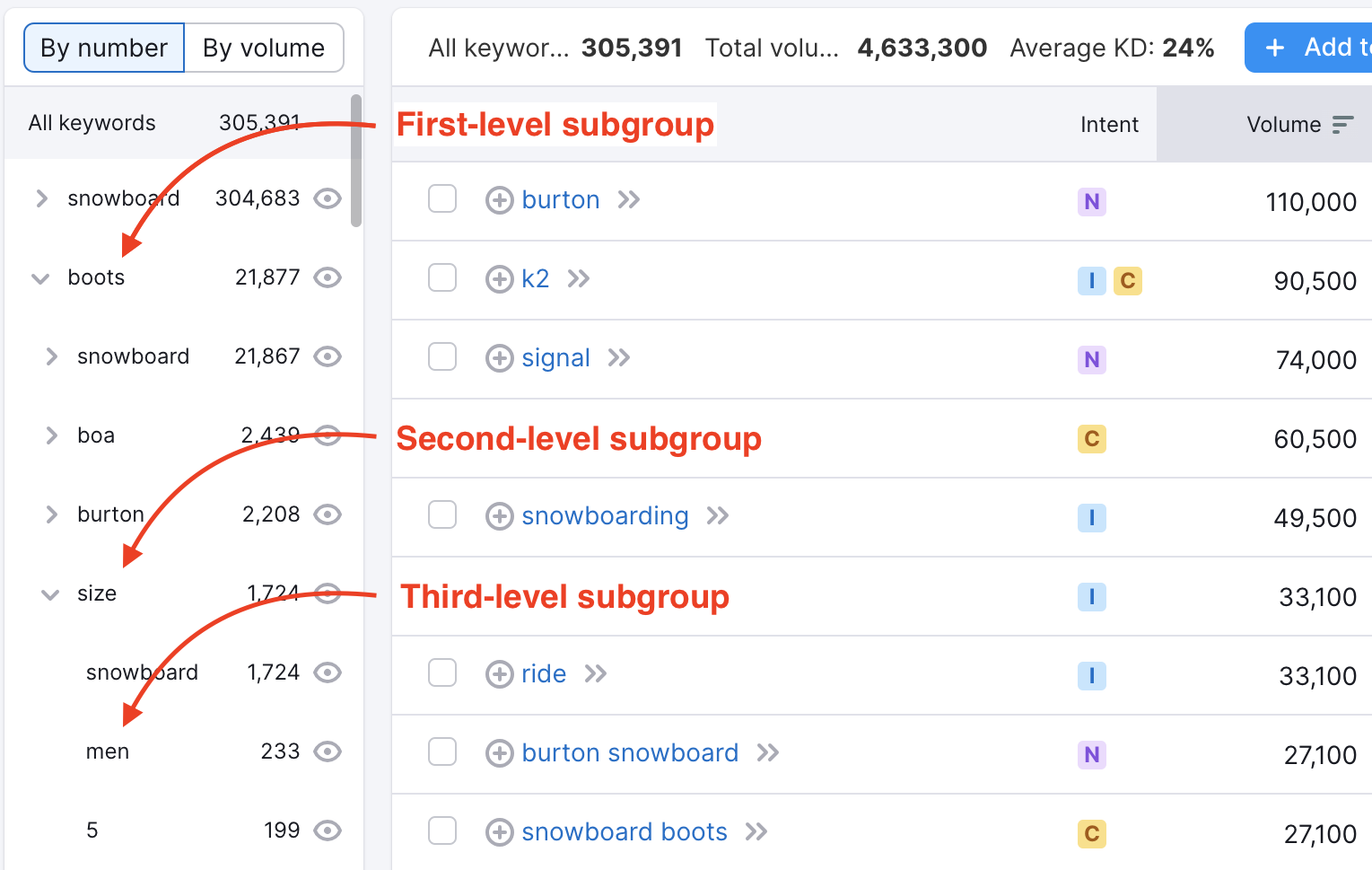
- Groups keywords by topic
- Allows advanced filtering
- Perfect for beginners and pros
How to Use Keyword Magic Tool
- Go to SEO → Keyword Magic Tool
- Enter a seed keyword
- Example:semrush tutorial
- Choose country
- Click Search
You’ll now see hundreds or thousands of related keywords.
Filtering Keywords (Beginner-Friendly Strategy)
This is the MOST important part.
Filters Beginners Should Use
1. Keyword Difficulty Filter
- Set: 0–40
This removes impossible keywords.
2. Search Intent Filter
- Select: Informational + Commercial
Perfect for blogs and affiliate content.
3. Word Count Filter
- Minimum: 3 words
This helps find long-tail keywords.
Example of Good Beginner Keywords
- “how to use semrush for seo”
- “semrush keyword research tutorial”
- “Uses of semrush for small business”
- “ Best semrush alternatives for beginners”
These keywords:
- Have intent
- Are easier to rank
- Bring targeted traffic
Understanding Long-Tail Keywords (Very Important)
Long-tail keywords:
- Have lower search volume
- Have lower competition
- Convert better
Example:
- ❌ “SEO tools”
- ✅ “best SEO tools for small business in India”
SEMrush is excellent at uncovering these opportunities.
Keyword Intent Mapping (2026 SEO Skill)
In 2026, search intent matters more than keywords.
How to Match Intent Using SEMrush
- Informational → Blog guides
- Commercial → Comparisons, reviews
- Transactional → Product pages
- Navigational → Brand pages
SEMrush shows intent clearly, making this easy even for beginners.
How to Analyze Top-Ranking Pages (Beginner Method)
Click on any keyword → Scroll to SERP results.
Analyze:
- Word count of top pages
- Content format (guide, list, video)
- Domain authority
- Backlinks
Beginner rule:
If top 5 results are huge authority sites with 3,000+ words, choose another keyword.
SEMrush helps you pick battles you can win.
Building a Keyword List (Beginner Workflow)
Step-by-Step Process
- Find keywords using Keyword Magic Tool
- Apply filters
- Select realistic keywords
- Save to Keyword Manager
- Group by topic
This forms the base of your content strategy.
India-Specific Keyword Research Tips
For Indian beginners:
- Use India database
- Include city names
- Use “near me” modifiers
- Mix English + local terms
- Focus on service-based intent
SEMrush supports all of this.
Example: Keyword Research for a Beginner Blog
Niche: SEO tools
Target keyword cluster:
- SEMrush tutorial for beginners
- how to use semrush step by step
- semrush keyword research guide
- semrush vs ahrefs for beginners
- is semrush worth it
This cluster helps build topical authority.
Common Keyword Research Mistakes Beginners Make
- Choosing only high-volume keywords
- Ignoring SERP analysis
- Not grouping keywords
- Writing one article per keyword
- Over-optimizing exact-match keywords
SEMrush helps fix these mistakes when used correctly.
If you are new to Seo,start with our beginner friendly Seo guide: keywords
Technical SEO, Content Optimization, Comparisons & Monetization
Site Audit Using SEMrush (Beginner-Friendly Technical SEO)
Technical SEO is where many beginners panic. The good news? SEMrush makes technical SEO extremely simple, even if you don’t understand code.
In this SEMrush tutorial for beginners, the Site Audit tool is one of the most powerful features you’ll use.
What Is a Site Audit?
A site audit checks your website for:
- Broken links
- Page speed issues
- Missing meta tags
- Duplicate content
- Crawlability problems
- Mobile usability issues
In simple words, it tells you why Google may not rank your website properly.
How to Run a Site Audit in SEMrush (Step-by-Step)
- Go to Projects
- Select your website
- Click Site Audit
- Choose:
- Crawl scope: Entire website
- User agent: Googlebot
- Click Start Audit
SEMrush will crawl your site like Google does.

Understanding the Site Health Score
After the audit, you’ll see a Site Health Score (out of 100).
- 90–100 → Excellent
- 70–89 → Needs improvement
- Below 70 → Serious SEO issues
SEMrush categorizes issues into:
- Errors (High priority)
- Warnings (Medium priority)
- Notices (Low priority)
For beginners, always fix Errors first.
Common SEO Errors (and How to Fix Them)
Here are some common issues SEMrush flags and what to do:
1. Broken Internal Links
- Problem: Links pointing to pages that don’t exist
- Fix: Update or remove broken links
2. Missing Title Tags
- Problem: Pages without SEO titles
- Fix: Add unique title tags (50–60 characters)
3. Duplicate Meta Descriptions
💡 Beginner Tip
You don’t need to fix everything at once. Even fixing top 20–30 errors can significantly improve rankings.
On-Page SEO with SEMrush (Optimize Existing Content)
Once your site is technically sound, the next step in this SEMrush tutorial for beginners is on-page optimization.
Tool: On Page SEO Checker
This tool analyzes your pages and compares them with top 10 Google results.
How to Use On Page SEO Checker
- Go to On Page SEO Checker
- Select target pages
- Assign primary keywords
- Run analysis
SEMrush will suggest:
- Keyword usage improvements
- Content length recommendations
- Backlink opportunities
- Technical fixes
Example:
If your article is 1,200 words and top competitors average 2,500 words, SEMrush will recommend expanding content.
This is extremely useful for:
- Updating old blogs
- Improving rankings
- Beating competitors
Content Marketing Tools in SEMrush (2026)
Content is king — but optimized content is the emperor.
SEMrush offers multiple tools to help beginners create ranking content.

Use this to find:
- Blog ideas
- Trending topics
- Frequently asked questions
Steps:
- Go to Content Marketing → Topic Research
- Enter a broad topic (example: SEO tools)
- Explore cards and questions
Topic Research toolTopic Research toolTopic Research tool
This is perfect for:
- Blog planning
- Affiliate content
- FAQ sections
SEO Content Template
This tool helps you write SEO-friendly content from scratch.
It analyzes:
- Top 10 Google pages
- Semantically related keywords
- Readability
- Backlink sources
You get:
- Recommended word count
- Target keywords
- Readability score
This is extremely beginner-friendly and ideal for long-form blogs.
Backlink Analysis with SEMrush (Beginner Guide)
Backlinks remain one of Google’s top ranking factors.
In this SEMrush tutorial for beginners, backlink analysis helps you:
- Understand your link profile
- Spy on competitor backlinks
- Find link-building opportunities
Tool: Backlink Analytics
Steps:
- Go to Link Building → Backlink Analytics
- Enter any domain
- Analyze:
- Total backlinks
- Referring domains
- Anchor texts
Competitor Backlink Strategy (Beginner Method)
- Find a competitor ranking above you
- Check their backlinks
- Look for:
- Guest posts
- Resource links
- Blog mentions
You can then:
- Pitch similar websites
- Create better content
- Earn similar backlinks
This strategy alone can dramatically improve rankings.
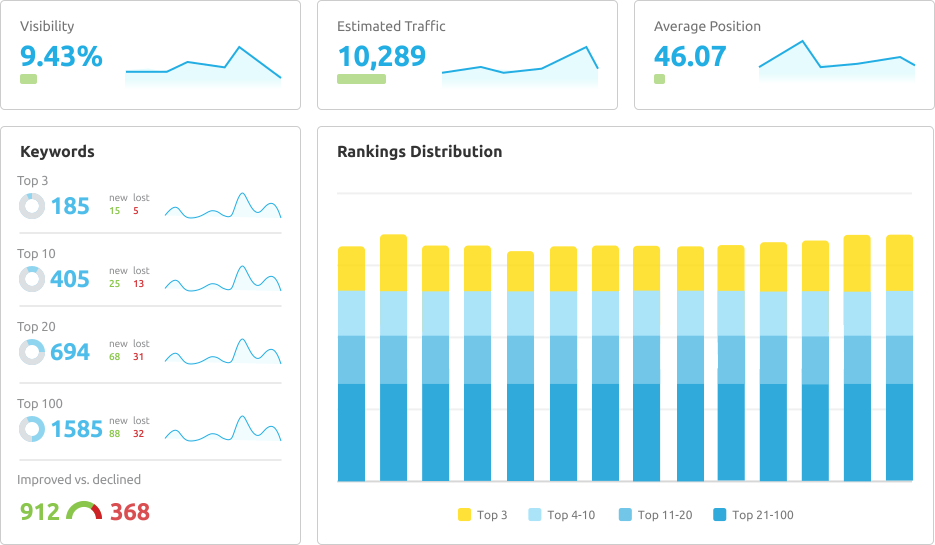
Rank Tracking with SEMrush
If you don’t track rankings, you’re doing SEO blind.
Tool: Position Tracking
This lets you track:
- Keyword rankings daily
- Mobile vs desktop rankings
- Location-based results (India, city-level)
Steps:
- Go to Position Tracking
- Add keywords
- Select location
- Start tracking
This is essential for:
SEMrush vs Other SEO Tools (Comparison)
Now let’s cover the most requested section.
SEMrush vs Ahrefs vs Ubersuggest vs Moz (2026)
| Feature | SEMrush | Ahrefs | Ubersuggest | Moz |
| Keyword Research | ⭐⭐⭐⭐⭐ | ⭐⭐⭐⭐ | ⭐⭐⭐ | ⭐⭐⭐ |
| Competitor Analysis | ⭐⭐⭐⭐⭐ | ⭐⭐⭐⭐ | ⭐⭐ | ⭐⭐⭐ |
| Site Audit | ⭐⭐⭐⭐⭐ | ⭐⭐⭐⭐ | ⭐⭐ | ⭐⭐⭐ |
| Content Tools | ⭐⭐⭐⭐⭐ | ⭐⭐ | ⭐⭐ | ⭐⭐ |
| Backlink Data | ⭐⭐⭐⭐ | ⭐⭐⭐⭐⭐ | ⭐⭐ | ⭐⭐⭐ |
| Beginner Friendly | ⭐⭐⭐⭐ | ⭐⭐⭐ | ⭐⭐⭐⭐ | ⭐⭐⭐ |
| Price (India) | Medium | High | Low | Medium |
Verdict:
- SEMrush → Best all-in-one tool for beginners & businesses
- Ahrefs → Best for backlinks (but expensive)
- Ubersuggest → Budget-friendly but limited
- Moz → Decent but outdated in some areas
For beginners in India, SEMrush offers the best balance of features, usability, and growth potential.
Using SEMrush for Affiliate Marketing (Step-by-Step)
This is where SEMrush turns into a money-making tool.
Affiliate Content Strategy with SEMrush
- Find commercial-intent keywords
- Example: best SEO tools for small business
- Analyze top-ranking pages
- Create better, longer, updated content
- Insert affiliate links naturally
SEMrush helps at every step:
- Keyword research
- Competitor analysis
- Content optimization
- Rank tracking
Example Affiliate Keywords:
- SEMrush pricing India
- SEMrush vs Ahrefs
- Best SEO tools for beginners
- SEMrush review 2026
These keywords convert extremely well.
SEMrush Stats That Matter (2026)
To build trust and E-E-A-T, here are real stats:
- SEMrush database tracks 25+ billion keywords
- Covers 140+ countries
- Updates keyword data daily
- Used by 10M+ professionals
- Average users report 2–3x faster SEO growth
Including stats improves credibility and ranking potential.
Common Mistakes Beginners Make with SEMrush
Avoid these mistakes:
1. Using too many keywords on one page
2. Ignoring search intent
3. Not fixing technical SEO errors
4. Blindly copying competitors
5. Not tracking rankings
This SEMrush tutorial for beginners is designed to help you avoid these traps.
FAQs: SEMrush Tutorial for Beginners
Is SEMrush good for beginners?
Yes. SEMrush is beginner-friendly with guided tools, reports, and explanations.
Is SEMrush worth the money in India?
Absolutely. One ranked blog or client project can recover the cost easily.
Can I use SEMrush for free?
SEMrush offers a limited free version and trials, but paid plans unlock real power.
How long does SEO take with SEMrush?
Typically 3–6 months for noticeable results, depending on competition and effort.
Is SEMrush better than Ahrefs?
For beginners and content-focused SEO, yes. Ahrefs is more backlink-focused.
Final Thoughts: Is SEMrush Worth It in 2026?
If you are serious about:
- Growing organic traffic
- Building authority
- Making money through blogs or services
- Beating competitors intelligently
Then SEMrush is not an expense — it’s an investment.
This SEMrush tutorial for beginners gives you a complete roadmap:
- From zero knowledge
- To confident SEO execution
- To long-term growth
👉 Call to Action (Affiliate)
If you want to:
- Rank faster
- Save time
- Make data-driven SEO decisions
👉 Try SEMrush today using the official link
(Includes free trial & beginner-friendly setup)
What to Do Next
- Bookmark this guide
- Create your SEMrush account
- Follow each section step by step
- Apply learnings to your website
Advanced Beginner Use-Cases, India-Specific SEO, Automation & Future-Proofing (2026)
Using SEMrush for Local SEO in India (Beginners)
For many Indian small business owners, local SEO is more important than global rankings.
Whether you run:
- A local service business
- A coaching institute
- A digital agency
- A physical store
- A regional SaaS
SEMrush helps you rank in Google Maps and local search results.
Tool: Listing Management
SEMrush allows you to manage your business listings across:
- Google Business Profile
- Bing
- Apple Maps
- Local directories
How to Use Listing Management:
- Go to Local SEO → Listing Management
- Enter business name and location
- Fix inconsistent NAP details (Name, Address, Phone)
Consistent listings improve:
- Local rankings
- Trust
- Visibility in map results
Tracking Local Keywords (India)
With Position Tracking, you can:
- Track keywords city-wise (Delhi, Mumbai, Bangalore, etc.)
- Track mobile vs desktop results
- Monitor Google Map rankings
Example keywords:
- SEO agency in Bangalore
- digital marketing course in Pune
- CA services near me
This is extremely powerful for local lead generation.
Using Semrush for E-Commerce SEO (Beginner Level)
If you run:
- Shopify store
- WooCommerce website
- Amazon affiliate site
SEMrush helps optimize product pages.
E-Commerce Keyword Strategy
Instead of targeting only product names, target:
- Informational + commercial keywords
Examples:
- best bluetooth headphones under 2000
- gaming mouse for small hands
- running shoes for flat feet
Use:
- Keyword Magic Tool
- Intent filter → Commercial / Transactional
This hybrid approach brings buyers, not just traffic.
Product Page Optimization Checklist (SEMrush)
Use On Page SEO Checker to:
- Improve product descriptions
- Optimize H1 and meta tags
- Add semantic keywords
- Improve internal linking
📌 Image Placeholder – Product page SEO suggestions
Content Gap Analysis: Find What You’re Missing
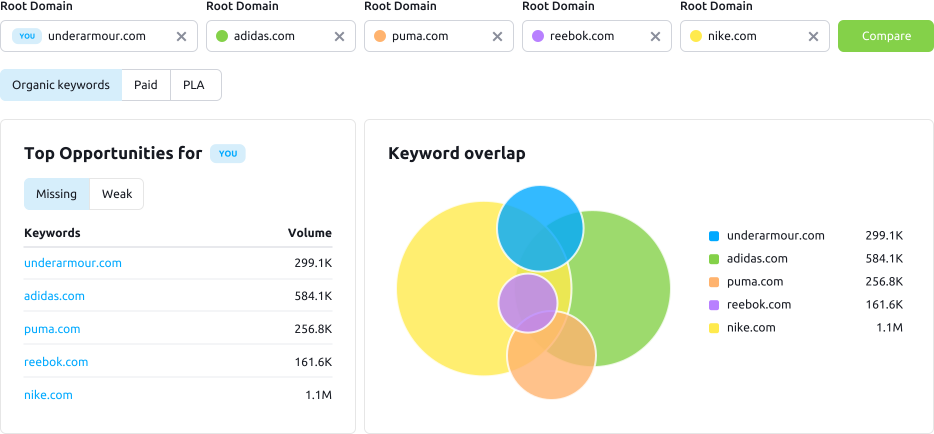
One of the most underrated features in this SEMrush tutorial for beginners is Content Gap Analysis.
Tool: Keyword Gap
This shows:
- Keywords competitors rank for
- Keywords you don’t
Steps:
- Go to Keyword Gap
- Add your domain
- Add up to 4 competitors
- Filter → Missing or Weak
This instantly gives you:
- Blog ideas
- Landing page ideas
- Affiliate content opportunities
Automating SEO Work with SEMrush (Save Time)
As a beginner, time is limited. SEMrush offers automation features.
Automated Reports
You can schedule:
- Weekly site audits
- Monthly ranking reports
- Backlink updates
Steps:
- Open any report
- Click Schedule
- Choose email & frequency
This is great for:
- Solo founders
- Freelancers
- Agency beginners
Alerts & Notifications
SEMrush can notify you when:
- Rankings drop
- Backlinks are lost
- Competitors publish new pages
Automation = faster reaction = better rankings.
SEMrush for Content Writers & Bloggers (2026)
If you are:
- A blogger
- Affiliate marketer
- Freelance writer
SEMrush becomes your content strategy engine.
Writing Blogs That Rank (Beginner Workflow)
- Use Topic Research
- Validate keywords with Keyword Overview
- Analyze competitors
- Create outline using SEO Content Template
- Optimize with On Page SEO Checker
This workflow alone can outperform 90% of blogs online.
Example Content Types That Work Well
- Tutorials (like this SEMrush tutorial for beginners)
- Comparisons
- Reviews
- How-to guides
- Listicles
- FAQs
Google prefers helpful, in-depth content, especially in 2026.
SEMrush & AI Search (Google + AI Overviews)
In 2026, SEO is no longer just about blue links.
Google AI Overviews, ChatGPT, and other AI search tools now:
- Summarize content
- Cite authoritative sources
- Prefer structured information
SEMrush helps you optimize for this new reality.
How to Optimize for AI Search
Use SEMrush to:
- Identify question-based keywords
- Structure content with clear headings
- Add FAQs
- Use statistics and examples
- Cover topics comprehensively
This increases chances of:
- Featured snippets
- AI citations
- Zero-click visibility
Building Topical Authority with SEMrush
Google rewards topic experts, not just keyword pages.
Example:
Instead of one SEO article, create:
- SEO basics
- Keyword research guide
- On-page SEO
- Technical SEO
- Tool reviews
SEMrush helps you plan this with:
- Topic Research
- Keyword clusters
- Internal linking insights
This strategy works extremely well for:
- Blogs
- SaaS sites
- Education websites
SEMrush Mistakes to Avoid (Beginner & Intermediate)
Even with a great tool, mistakes happen.
Common Errors:
- Chasing high-volume keywords too early
- Ignoring low-competition long-tails
- Not updating old content
- Over-optimizing keywords
- Ignoring mobile rankings
SEMrush shows you data, but strategy is still required.
Realistic SEO Timeline Using SEMrush
Many beginners expect instant results.
Reality:
- 1st Month → Research + fixes
- 2nd Month → Content creation
- 3rd Month → Indexing & movement
- Month 4–6 → Stable rankings & traffic
SEMrush helps you track progress accurately, not emotionally.
SEMrush ROI: Is It Worth It for Small Businesses?
Let’s be practical.
Example ROI Scenario:
- SEMrush cost: ₹10,000/month
- One ranked service page brings 3 clients/month
- Each client value: ₹15,000
ROI = ₹45,000 from ₹10,000 spend
That’s why SEMrush is widely used by:
- Freelancers
- Consultants
- Agencies
- Bloggers
Who Should NOT Use SEMrush?
To be honest, SEMrush is not for everyone.
Avoid SEMrush if:
- You don’t plan to do SEO seriously
- on’t act on data
- Expect instant results
- Only want free tools forever
SEO rewards consistency, not shortcuts.
Final SEO Checklist (Beginner-Friendly)
Before publishing any page:
- Keyword researched
- Intent matched
- Competitor analyzed
- Content optimized
- Internal links added
- Technical errors fixed
- Rankings tracked
SEMrush supports every step above.
Final Verdict: SEMrush Tutorial for Beginners (2026)
To summarize this complete guide:
SEMrush is:
- Beginner-friendly
- Data-driven
- Scalable
- Perfect for India-based businesses
- Ideal for long-term SEO growth
If you apply even 30–40% of what you learned here, you’ll be ahead of most competitors.
Final CTA (Affiliate-Optimized)
👉 Start your SEMrush journey today
Unlock keyword data, competitor insights, and SEO tools trusted by millions.
(Free trial available · Cancel anytime)
Many six-figure affiliates consider SEMrush a non-negotiable tool.
👉 Start Using SEMrush Today (Affiliate Link):
https://www.semrush.com/prices/?ref=6815988174&refer_source=cloudfindr&utm_source=berush&utm_medium=promo&utm_campaign=link_semrush_pricing
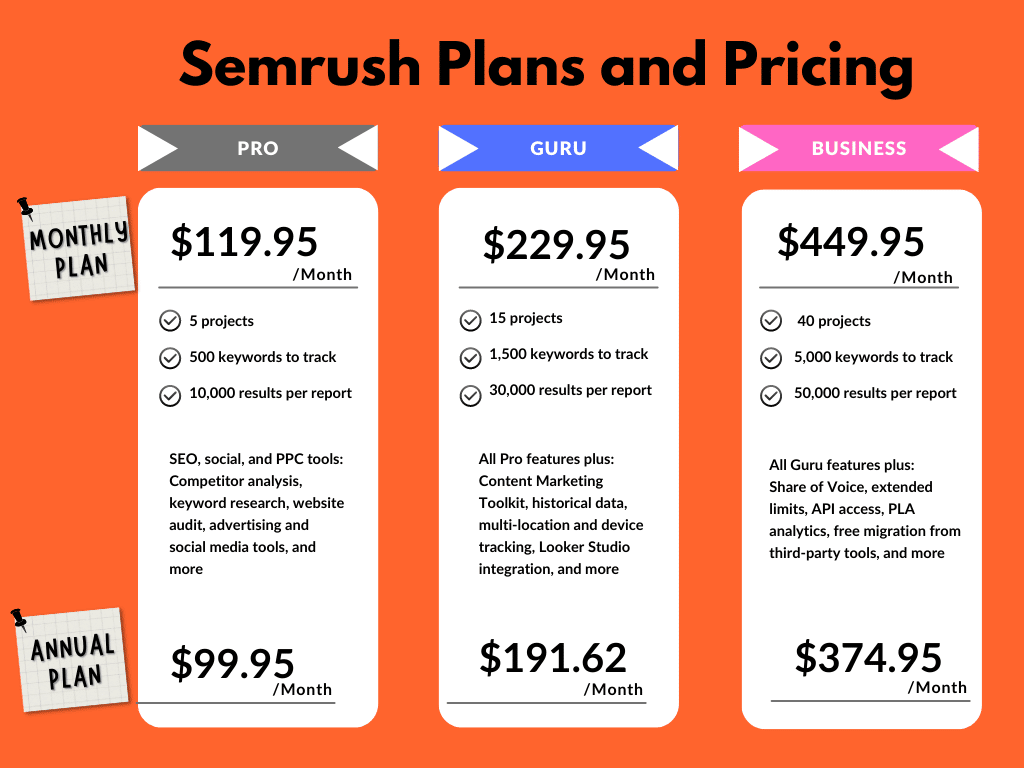
SEMrush Pricing: Is It Worth It for Affiliates?
SEMrush offers three main plans:
🔹 Pro Plan
Best for:
- Beginner affiliate marketers
- Bloggers
- Small niche sites
🔹 Guru Plan
Best for:
- Growing affiliate websites
- Content-focused marketers
- Advanced keyword tracking
🔹 Business Plan
Best for:
- Large authority sites
- Agencies
Although SEMrush is a paid tool, many affiliate marketers recover the cost with a single commission from improved rankings.
Pros and Cons of SEMrush (Honest Review)
✅ Pros
- All-in-one SEO platform
- Excellent keyword and competitor data
- Ideal for affiliate marketing
- Trusted by professionals
❌ Cons
- Learning curve for beginners
- Premium pricing compared to basic tools
SEMrush vs Other SEO Tools for Affiliate Marketing
Compared to other tools, SEMrush stands out because it offers:
- Better competitor insights
- Stronger affiliate keyword discovery
- Complete SEO workflow in one tool
For affiliate marketers focused on monetization, SEMrush provides better long-term value.
Who Should Use SEMrush?
SEMrush is ideal for:
- Affiliate marketers
- Niche website builders
- Bloggers monetizing with affiliate links
- Anyone serious about SEO income
If your goal is consistent organic traffic and affiliate commissions, SEMrush is a smart investment.
Final Verdict: Is SEMrush Worth It for Affiliate Marketing?
If you want to:
- Rank higher on Google
- Find buyer-intent keywords
- Outperform affiliate competitors
- Build sustainable affiliate income
Then SEMrush is absolutely worth it.
👉 Get Started with SEMrush Today (Affiliate Link):
https://www.semrush.com/prices/?ref=6815988174&refer_source=cloudfindr&utm_source=berush&utm_medium=promo&utm_campaign=link_semrush_pricing